


WhatANoise
Version 0.1.0
Your Voice — Your Band — Your Community. MQTT-based chat with end-to-end encryption, built with GTK4 and libadwaita.
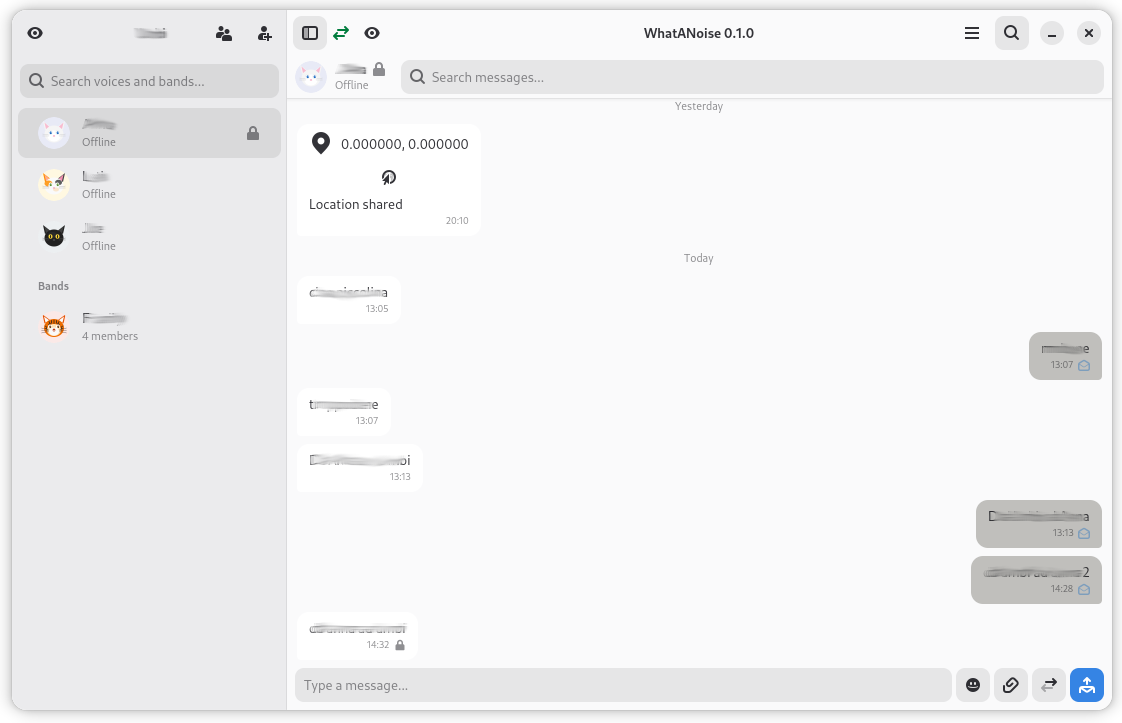
Features
MQTT-Based Messaging
Uses any standard MQTT broker (Mosquitto, HiveMQ) as the sole message transport. No proprietary server, no cloud dependency — just connect to a broker and start chatting.
End-to-End Encryption
Optional E2E encryption via libsodium — X25519 key agreement, Ed25519 signing, XChaCha20-Poly1305 AEAD. Trust On First Use (TOFU) model with fingerprint verification and key change warnings.
Bands (Group Chat)
Named group conversations with per-member message fan-out, custom avatars and backgrounds, drag-and-drop member management, and band-level chat history.
Rich Text Editor & Attachments
Bold, italic, underline, strikethrough, superscript, subscript, and monospace formatting. Attach images, files, audio recordings, and video clips — up to 1 MB per message, embedded in CBOR.
Live Messaging
Stream live GPS location or demo signals in real-time. Receivers see sparkline graphs updating live, with suspend/resume/terminate controls and automatic restart on app relaunch.
Cross-Community Communication
MQTT bridges connect separate broker communities. Messages route automatically across communities with clear visual identification of remote voices and bands.
Local-Only Storage
All messages stored locally as CBOR files — no central server database. Per-contact and per-band chat histories with soft delete, backup/restore, and multi-profile support.
Headless CLI Tool
Full backend access without a GUI. Send and receive messages, manage voices and bands, create backups — all from the command line for scripting and automation.
Use Cases
Private Team Communication
Set up a Mosquitto broker on your local network for team chat with no cloud dependency. E2E encryption ensures even the broker operator cannot read messages.
IoT & Embedded Monitoring
Use the live messaging feature to stream sensor data, GPS positions, or device telemetry. The CLI tool enables headless integration with embedded systems and automation scripts.
Multi-Site Office Communication
Connect offices via MQTT bridges for cross-community messaging. Each site runs its own broker with automatic message routing between communities.
Field Operations
Share live GPS positions with team members during field work. Real-time sparkline graphs show movement patterns, with configurable distance thresholds and duration limits.
User Manual
WhatANoise vs WhatsApp vs Telegram
WhatANoise advantages are shown in bold.
| Feature | WhatANoise | Telegram | |
|---|---|---|---|
| Infrastructure | Self-hosted MQTT broker — full control | Meta cloud servers | Telegram cloud servers |
| Identity | UUID-based — no phone number required | Phone number required | Phone number required |
| Data storage | Local-only CBOR files — nothing on server | Cloud backup (Google/iCloud) | Cloud-stored (server-side) |
| E2E encryption | libsodium (X25519 + XChaCha20-Poly1305) | Signal Protocol (default) | MTProto (Secret Chats only) |
| Open protocol | Standard MQTT — any broker works | Proprietary | Proprietary (MTProto) |
| Source code | Open source (MIT license) | Closed source | Client open, server closed |
| Metadata collection | None — no analytics, no tracking | Collects metadata | Collects metadata |
| CLI / automation | Full headless CLI tool | No CLI | Bot API only |
| Live data streaming | GPS, signals, IoT with sparkline graphs | Live location only | Live location only |
| Federation | MQTT bridges across communities | No federation | No federation |
| Multi-profile | Independent profiles on one machine | One account per device | One account per device |
| Customization | Per-voice backgrounds, bubble colors | Limited wallpapers | Themes and wallpapers |
| Rich text | Bold, italic, underline, sub/superscript | Bold, italic, strikethrough | Bold, italic, underline, mono |
| Group chat | Bands (group messaging) | Groups and communities | Groups, channels, topics |
| Voice/video calls | Text-only (not supported) | Voice and video calls | Voice and video calls |
| Mobile apps | Android (coming soon) | Android, iOS | Android, iOS |
| Desktop app | Native GTK4/libadwaita | Electron wrapper | Electron / native (macOS) |
| Max file size | 1 MB per message | 2 GB | 2 GB |
| User base | New — self-hosted communities | 2+ billion users | 800+ million users |
| Offline messages | Broker queues (clean_session=false) | Cloud delivery | Cloud delivery |
| Backup/restore | Built-in tar.gz archive + safety backup | Google Drive / iCloud | Cloud-based (automatic) |
Key advantages of WhatANoise:
- Total sovereignty — you own the infrastructure, the data, and the protocol. No corporate intermediary
- Zero metadata leakage — no phone number, no contact upload, no usage tracking, no analytics
- IoT and automation ready — the CLI tool and live streaming make it ideal for machine-to-machine and field operations
- Federated by design — MQTT bridges connect independent communities without a central authority
- Transparent encryption — open-source libsodium with verifiable fingerprints, not a proprietary black box